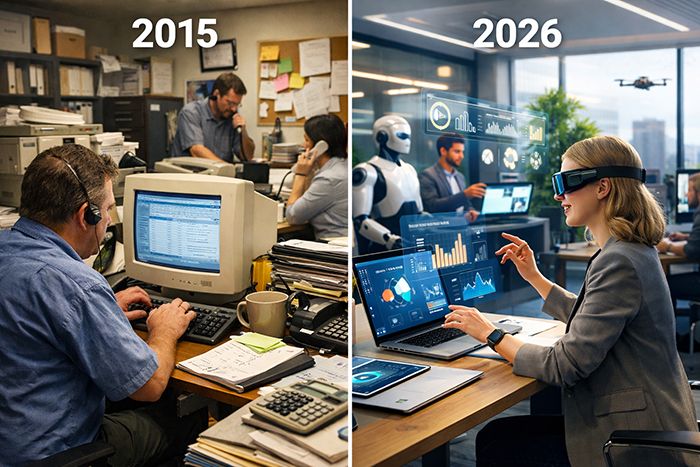
Why 73% of Small Businesses Are Still Running Their Operations Like It’s 2015
Summary
- While 84% of small businesses use some form of digital technology, many are still operating with outdated systems that were considered state-of-the-art in 2015
- Many small business owners point to budget constraints, fear of disruption, and lack of technical knowledge as the main obstacles to modernizing their operations
- The hidden productivity costs of outdated systems can drain up to 30 hours of work time weekly—equivalent to $25,000-$75,000 annually in lost revenue
- A Business Operating System like EM2-BOS can replace 5-10 disconnected tools while providing enterprise-level automation at small business prices
- Small businesses that modernize their operations are 3.5x more likely to survive beyond the critical 5-year mark
While your business may be operating in 2026, your systems are likely stuck in 2015. If you’re still managing customer information in spreadsheets, printing documents for signatures, or manually entering the same data across multiple platforms, you’re not alone. An astonishing 73% of small businesses are operating with technology and processes that were cutting-edge during Obama’s presidency.
While the pandemic pushed many small businesses to incorporate some digital tools such as video conferencing and basic e-commerce, the majority of operational systems are still stuck in the past. This technological standstill is causing a growing competitive divide between businesses that have fully updated and those stuck in old-fashioned workflows.
Take a look at your workspace. Are there piles of paperwork? Numerous passwords jotted down on Post-It notes? A financial system that doesn’t communicate with your customer relationship management (CRM) system? These are all signs of a business operating system that’s in desperate need of an upgrade. The question is no longer whether you need to update—it’s how quickly you can do it before your competitors overtake you.
Remember 2015? If your small business had a website and a Facebook page, you were ahead of the game. Cloud computing was still a novelty for small businesses. “Digital transformation” was a phrase more likely to be heard in a corporate boardroom than in a local mom-and-pop shop. What seemed innovative then—having a basic online presence, using different digital tools for different functions, and automating simple tasks—is now the bare minimum needed to stay afloat.
Small business owner Maria Chen had a wake-up call during a meeting with a client. “I was desperately digging through emails, text messages, and paper notes to find information about their previous order. Meanwhile, my competitor across town had all of their customer information at their fingertips on a tablet. That’s when I knew my systems were outdated.”
What’s more worrying is not only that small businesses are using old technology, but they’re also sticking with inefficient operating models based around these limitations. When your business operations are designed for disconnected systems, you’re not just missing out on better software; you’re also missing out on opportunities to completely change how your business works.
What’s Keeping Small Businesses From Updating Their Operations
Figuring out why such a large number of businesses are still using outdated operational models is a complicated task, involving a mix of real-world issues and psychological obstacles. Even though it’s clear that they need to modernize, the way forward is often clouded by genuine challenges. For more insights on this topic, explore the small business statistics that highlight these operational hurdles.
Tight Financial Restrictions
Many small businesses are deterred from even minor advancements because they believe that modernizing operations requires a huge capital investment. A survey of small business owners showed that 61% consider cost to be a major issue when thinking about new technologies. What a lot of them don’t understand is that the cost of business technology has changed drastically since 2015.
Modern cloud-based solutions work on subscription models that do away with hefty initial investments. A comprehensive Business Operating System such as EM2-BOS, for instance, can take the place of 5-10 disconnected tools at a fraction of their combined cost. This subscription-based model transforms technology from a capital expense into an operational one, making enterprise-level systems accessible to even small-sized businesses.
Many times, the true budget limitation isn’t the cost of new tech, but the hidden expenses of keeping old systems running—like lost productivity, missed sales opportunities, and the rising cost of maintaining old systems. As one small business consultant put it, “Companies focus on the sticker price of new solutions while ignoring that their current approach is likely costing them five times more in invisible expenses.”
When you do the math, you’ll find that most operational modernization initiatives pay for themselves within 3-6 months just from improved efficiency, and that’s not even counting increased revenue opportunities.
Anxiety Over Daily Operations Interruptions
- 63% of small business owners are concerned that integrating new systems will lead to operational downtime
- 57% are apprehensive about employee pushback to new processes and technologies
- 49% have worries about data migration and loss during the transition period
- 38% are anxious about customer confusion during operational changes
The anxiety that modernizing will interrupt existing business operations is both valid and frequently overblown. While any transition necessitates some adjustment period, modern implementation methods have been developed specifically to reduce disruption. The phased implementation methodology used by solutions like EM2-BOS allows businesses to slowly transition each operational area while maintaining continuity.
Not Technically Savvy
One of the most significant barriers to modernizing is not knowing where to begin. In a recent survey of small business owners, 72% admitted that they feel overwhelmed by the options available in technology and lack the expertise to determine which solutions would best meet their needs. This lack of knowledge leads to decision paralysis, with many business owners putting off crucial upgrades indefinitely to avoid making the wrong choice.
Technical knowledge barriers often extend beyond just selecting a system to also implementing and maintaining it. Many small business owners have real concerns about becoming reliant on systems they don’t fully understand or have control over. “I know my current processes like the back of my hand,” explains James Wilson, owner of a local service business. “With these new cloud systems, I’m concerned about what happens if something breaks and I can’t fix it myself.”
The rise of business technology services has opened up new possibilities. Services such as EM2-BOS now provide deployment services that are specifically designed for business owners who are not tech-savvy. The White Glove deployment takes care of all the technical setup while also training your team on how to use it on a daily basis. This hands-on approach closes the knowledge gap without requiring business owners to become tech experts themselves.
The “If It’s Not Broken, Don’t Fix It” Approach
Many small business owners are content with their operational systems until they suddenly break down. This reactive attitude towards technology is a risky move. The most harmful part of outdated operations is that issues build up over time, often only becoming noticeable when they’ve escalated to emergency levels.
Let’s consider data security. A lot of small businesses that are still using systems from 2015 often don’t understand how exposed their customer and business data are until they suffer a breach. When that happens, the harm to their reputation and finances can be disastrous. In the same way, customer expectations have changed significantly since 2015, with 74% now expecting flawless digital interactions even from the smallest businesses.
Today, “if it ain’t broke, don’t fix it” is a rapidly declining standard. The competitive landscape of today demands that businesses strive for operational superiority, rather than merely being adequate. As one business consultant puts it, “The question isn’t whether your current systems work—it’s whether they work well enough to keep you competitive for the next five years.”
What Operations From 2015 Look Like Today
If you want to know whether your business is still running on outdated systems, look for these signs. These were common in 2015, but today, they put you at a serious competitive disadvantage.
Sticking to Traditional Bookkeeping Instead of Embracing Cloud Accounting
Is your business still clinging onto desktop accounting software, spreadsheets, or even old-school paper-based bookkeeping? If so, you’re at a major disadvantage. Contemporary cloud accounting systems do more than just automate data entry and reconciliation. They also offer real-time financial insights that allow you to make quicker, more informed business decisions.
There’s a clear contrast: businesses that employ cloud accounting spend 49% less time on financial administration and identify cash flow problems approximately 4.5 weeks earlier than those that use traditional methods. This early warning system can be the difference between a proactive adjustment and a financial crisis.
Traditional Paperwork
Companies that continue to use filing cabinets and paper documents are dealing with daily inefficiencies. Every printed form, contract signed by hand, or document filed physically is a waste of time in terms of management, storage, and retrieval. The environmental impact and storage costs are also worth considering. For more insights, check out this research on small business statistics.
Going digital with your document management doesn’t just get rid of paper, it turns documents into searchable, actionable business assets. When you integrate it into your business operating system, documents become part of automated workflows rather than workflow bottlenecks. Customer agreements automatically trigger fulfillment processes, signed proposals immediately update sales pipelines, and important documents can be retrieved from anywhere in an instant.
Behind-the-Times Customer Relationship Management
If your customer data is stored in spreadsheets, email inboxes, or even worse—in the heads of your sales team—you’re operating with a 2015 mentality in a 2026 marketplace. Today’s CRM solutions have grown from basic contact databases to full-fledged relationship management centers that monitor all customer interactions across channels. Discover the hidden costs of CRM integrations that could be affecting your business.
Weaknesses in Security
Since 2015, there have been significant changes in the realm of security, but 43% of small businesses still don’t have a plan in place for cybersecurity defense. Older systems often don’t have the necessary security features like two-factor authentication, data storage encryption, and automatic security updates. This gap in security leaves businesses exposed to more complex attacks that are specifically aimed at small businesses. Hackers see these businesses as “soft targets” with valuable data and little protection. For more insights on how small businesses have evolved, check out this small business statistics report.
Shortcomings in Customer Experience
Arguably the most noticeable consequence of outdated operations is the shortcomings in customer experience. In this day and age, consumers expect flawless interactions across all platforms—whether they’re making purchases online, calling for inquiries, or visiting a physical store. Businesses that still operate with 2015 systems usually provide disjointed experiences where customer data doesn’t transfer between touchpoints.
These gaps result in annoying situations like customers having to repeat information they’ve already given online when they call, or store employees having no insight into a customer’s online purchase history. These friction points may seem small on their own, but together they show customers that your business is not keeping up with current trends.
Customer perception is significantly influenced, with 76% of customers indicating that they see businesses with seamless omnichannel experiences as more up-to-date and reliable. Even more worryingly, 68% state they are less likely to revisit businesses where they have to constantly supply the same information.
- 70% of consumers want businesses to provide online scheduling options
- 83% want to have the option to receive digital receipts and documentation
- 65% expect employees to have immediate access to their purchase history and preferences
- 77% prefer businesses that offer multiple communication channels (email, text, chat)
Employee Retention Issues
The hidden cost of outdated operations often shows up in employee satisfaction and retention. Today’s workforce increasingly evaluates employers based on the quality of tools and systems they provide. Businesses still operating with 2015 technology find it increasingly difficult to attract and retain talent, especially younger workers who have grown up with modern digital tools.
Here are some reasons why businesses should update their operations:
- 67% of employees are frustrated with outdated workplace technology
- 42% have thought about leaving their jobs because of inadequate digital tools
- 83% say that modern systems are an important factor when they’re looking at potential employers
- 56% of younger workers (those under 35) think that outdated systems mean that a company isn’t forward-thinking
Outdated operations don’t just make it harder to recruit employees, they also directly impact productivity. Employees spend an average of 22% of their time managing workflow inefficiencies that could be automated. This lost productivity doesn’t just hurt your bottom line, it also creates a work environment that’s demoralizing. Skilled employees spend time on low-value administrative tasks instead of meaningful work.
The issue becomes more severe as rivals update their systems. As one entrepreneur pointed out, “We lost three of our top employees in half a year after our main competitor modernized their systems. Our staff felt like they were professionally falling behind by remaining with us.”
Essential Modern Business Technology for Today’s Small Businesses
Today’s small businesses are not just using a bunch of disconnected tools. Instead, they are building a technology stack that focuses on integration and automation. The heart of this stack is a Business Operating System that links together the different operational components. This is not about adding more tools but rather about using smarter, interconnected systems.
The fundamental elements of a business technology infrastructure prepared for 2023 are crucial for adapting to the evolving landscape. For more insights on how small businesses have transformed since the pandemic, you can read this Experian article.
Here are some examples of modern tools that are commonly part of a Business Operating System:
- Unified Business Operating System – This is a central platform that integrates customer data, communications, workflow automation, and reporting. It’s like the command center for your business.
- Cloud Accounting with Payment Processing – This is a seamless financial management system with integrated invoicing and payment collection. It’s like having your own personal accountant.
- Digital Document Management – This is an electronic document creation, signing, storage, and retrieval system. It’s like having a virtual file cabinet.
- Omnichannel Communications – This is an integrated email, text, chat, and voice communications system with a complete customer history. It’s like having a personal assistant who remembers everything.
- Automated Marketing Tools – These are systems for customer outreach, follow-up, and nurturing that work even when you’re not. It’s like having a 24/7 marketing team.
The key difference between these modern tools and the tools that were popular in 2015 isn’t just that they’re digital instead of analog—it’s that they’re integrated. Today’s Business Operating Systems like EM2-BOS connect these tools into a cohesive whole, eliminating data silos and manual transfers between systems. This integration creates exponential efficiency gains compared to even the best collection of disconnected digital tools.
Updating Your Business Without Spending a Fortune
Fortunately, updating your business operations doesn’t mean you have to change everything overnight or invest a huge amount of money. By focusing on implementing changes in areas that will have the most impact, you can make significant improvements while keeping the pace of change manageable and the budget reasonable. Consider exploring all-in-one systems that local businesses are quietly switching to for a cost-effective solution.
Begin With The Most Profitable Systems
All operational improvements aren’t created equal. Start with the systems that directly influence revenue or significantly cut down on manual labor. For the majority of small businesses, this means focusing on customer relationship management, marketing automation, and digital payment systems.
For businesses that provide services, the biggest returns typically come from appointment scheduling and service management. These tools often pay for themselves within one to three months due to increased booking rates and less time spent on administrative tasks. For retail and product businesses, inventory management and e-commerce integration often provide the quickest returns. The trick is to figure out what your specific operational issues are and tackle those first.
Try Out Free Versions of Tools First
Most up-to-date business tools offer free basic versions or trial periods that let you try out their features before you have to pay anything. This step-by-step approach allows you to confirm the usefulness of new systems without having to invest much. Start with these beginner-level options to get used to new processes before upgrading to more advanced solutions.
Yet, you should be wary of basing your long-term operations on a mishmash of free tools that have limited integration capabilities. While this method can work for initial testing, the efficiency gains of truly integrated systems usually justify the investment in comprehensive solutions as you become more comfortable.
Roll Out Changes in Stages
- Stage 1: Centralize client data and communications (1-4 weeks)
- Stage 2: Automate regular administrative tasks and follow-ups (2-6 weeks)
- Stage 3: Incorporate payment processing and financial management (3-8 weeks)
- Stage 4: Implement advanced marketing automation and analytics (4-12 weeks)
Rolling out changes in stages allows your team to adjust slowly while making continuous improvements. Each stage should deliver tangible benefits that help fund the next stages through efficiency gains or increased revenue. This self-funding model makes modernization accessible even for businesses with limited capital resources.
The best modernization efforts begin with the central operations that have a direct effect on customer experience and team efficiency. By prioritizing the systems that drive your daily operations, you can quickly make improvements that generate momentum and support for additional changes.
Triumphs: Small Businesses That Took the Plunge
Neighborhood Bakery Sees Two-Fold Increase in Revenue Through Online Orders
Family Flour Bakery didn’t just add a new sales channel when they put in place an integrated online ordering system tied to their production schedule. They were revolutionizing their entire operation. For years, owner Sarah Lindon had been apprehensive about expanding beyond a basic website. She was worried that online orders would create chaos in their in-store workflow.
What she found was eye-opening. “Not only did we see a 115% increase in revenue in the first year from online orders, but having all orders flow through one system actually simplified our production planning,” says Lindon. This integration took the daily guessing game of how much to bake out of the equation, reducing waste by 23% and ensuring popular items were always available. Additionally, the bakery’s new Business Operating System automated customer follow-ups, resulting in a 67% increase in repeat orders from new customers.
Plumbing Company Sees 35% Boost in Jobs after Implementing Digital Scheduling
Metropolitan Plumbing swapped out their old paper-based scheduling system for a new integrated field service platform. This allowed customers to schedule appointments online and technicians to view job details on a mobile app. The results were immediate. Appointment bookings shot up by 35% in the first month, mostly from customers scheduling in the evening when the office was closed. Even more noteworthy was the 28% decrease in administrative hours needed to handle scheduling. This freed up the office manager to concentrate on customer service and growth plans instead of paperwork.
Accounting Firm Slashes Client Response Time by 70%
Accurate Tax & Accounting adopted a Business Operating System to manage client communications and document workflows, completely revolutionizing their client experience. Prior to this, client inquiries would be scattered across different team members’ email inboxes, often taking anywhere between 1-3 days for a response. Their new unified communications hub directs all client inquiries to a central dashboard where any available team member can respond, slashing the average response time to under 2 hours. This operational upgrade didn’t just boost client satisfaction—it directly impacted revenue, with the firm experiencing a 22% increase in referrals from existing clients who stated their responsive service as the main reason for recommending the firm.
30-Day Plan to Modernize Your Business
Modernizing your business operations can seem daunting, but it doesn’t have to be. This 30-day plan provides a structured approach to improvement that any small business can follow. The aim isn’t to completely transform your business in a month, but to start the process with clear, achievable goals.
Week 1: Review Your Existing Systems
Start by taking stock of your current operational workflows, with a special focus on how information and tasks are processed in your business. You should be especially vigilant for manual processes, double data entry, and communication choke points. This review will give you a solid base for targeted improvements.
Carry out this review by observing each role in your company for several hours at the very least. See how your staff deals with client data, processes orders, plans services, and manages follow-ups. Record not just the systems they employ, but also the amount of time each procedure takes and where difficulties arise.
Here’s what you need to do:
- Track customer interactions from the first point of contact to ongoing service
- Take inventory of all software tools and manual processes you’re currently using
- Take note of key operational metrics (such as response times and fulfillment time)
- Figure out how much time is spent on administrative tasks versus revenue-generating activities
When you conduct this audit, you’ll typically find that your team is spending 40-60% of their time on low-value administrative tasks that could be automated. You’ll also likely discover that customer information is scattered across 5-7 different places, which leads to communication gaps and inconsistent experiences.
After the first week, you should know where your business is falling short and have a list of what needs to be fixed, in order of importance. This list should weigh the benefits (like time saved or more money made) against how hard it will be to make the changes. For more insights, you can explore small business statistics that highlight common challenges and opportunities.
Week 2: Look for Modern Solutions
Now that you have your priority list, it’s time to start looking for modern solutions that can help you overcome your operational challenges. Start by looking at Business Operating Systems that can act as your central platform. Then, look at specialized tools that can be integrated with your core system for any needs specific to your industry.
When considering different solutions, it’s important to not only look at the features they offer, but also understand what will be required for implementation, what kind of ongoing support will be necessary, and what the total cost of ownership will be. Sometimes, the solution with the most features isn’t the best choice if it requires technical expertise that you don’t have or if it’s so complex that your team will resist using it.
Week 3: Try Out New Solutions
Choose your preferred Business Operating System and start a controlled pilot implementation that focuses on one high-priority workflow. This limited scope lets you confirm the solution’s effectiveness without disturbing your whole operation. Most modern platforms provide trial periods or demonstration environments that make this testing phase easier.
Week 4: Training and Implementation
- Develop simple training materials based on workflow and daily tasks
- Train a “super user” who can answer common questions and provide internal support
- Start by implementing the core system with essential workflows, then gradually add complexity
- Set clear metrics to measure the impact and ROI of the new systems
The most successful implementations are those that secure early victories, showing immediate value to your team. Start with the most painful manual processes, where automation can clearly save time. These quick victories build momentum and enthusiasm for broader adoption.
It’s important to keep in mind that implementing technology is as much about the people involved as it is about the software itself. Engage your team in the selection process, take their concerns into account, and highlight how new systems will remove the need for tedious manual tasks rather than replacing their jobs. For more insights, consider the differences in business operating systems.
Just because the software is set up doesn’t mean you’re done. Plan to have regular check-ins for the first few months to spot any adoption issues and continually fine-tune your workflows. The businesses that see the most benefit from operational modernization see it as a continuous process of improvement, not a one-and-done project.
When the task feels daunting, you might want to collaborate with an implementation partner that focuses on small business operations. Services like EM2-BOS provide White Glove service where tech experts take care of the complete setup process, freeing you to concentrate on your business while they set up your systems following best practices.
Why 2026 Is the Make-or-Break Year for Small Business Tech
While 2026 marks a significant turning point for small business operations, more and more experts are pointing to 2026 as the real cut-off point for operational modernization. The coming together of AI-powered automation, shifting workforce expectations, and changing customer demands is widening the gap between digitally mature businesses and those holding on to old operational models.
Studies show that by 2026, companies that have embraced digital operations will enjoy profit margins 40-60% higher than their industry counterparts. This is mainly due to labor efficiency and increased customer retention. For businesses that are slow to modernize, the news is even more alarming: 43% of small businesses that are still using systems from before 2020 are expected to face serious competition by 2026. 27% of these businesses are in danger of becoming obsolete in the market. The message is clear: modernization is no longer just about gaining an edge; it’s increasingly about survival in the market.
Commonly Asked Questions
When thinking about updating your business operations, you probably have some questions about what it will entail, how much it will cost, and what problems you might run into. The answers to these questions address the most frequent concerns small business owners have when they start to improve their operations.
The silver lining is that there are thousands of businesses that have successfully made this transition before you, providing a well-trodden path with outcomes you can anticipate and risks that are manageable.
What is the average cost to update small business operations?
Modernizing operations can range in cost based on the size of the business, the complexity of the operations, and the method of implementation. Generally, small businesses can expect to pay between $555 and $1,500 monthly for a complete Business Operating System. Implementation fees can range from $1,000 to $5,000, depending on the complexity of the operations and the level of customization necessary. Choosing to implement the system yourself can lower the upfront costs, but it usually takes longer and can lead to missed optimization opportunities. Don’t forget to consider the value of time saved (usually 15-30 hours per week for a team of five) and the potential for increased revenue from an improved customer experience when evaluating the costs.
Is it possible to upgrade my business operations without being tech-savvy?
Absolutely. Modern Business Operating Systems are becoming more user-friendly, with easy-to-understand interfaces and step-by-step setup processes. Options like EM2-BOS offer a White Glove setup option where the tech pros handle all the setup while training your team on how to use it daily. This eliminates the need for you to have a tech expert on staff while making sure your systems are set up in the best way for your industry.
What’s the first system I should upgrade in my small business?
For the majority of small businesses, the best place to start is by introducing a central Business Operating System that handles customer data and communication. This foundation tackles the most frequent operational issues—scattered customer information, inconsistent follow-ups, and manual communication workflows. Once this main system is set up, focus on integrations that get rid of manual data input and paper-based processes, as these usually provide the fastest efficiency improvements.
When should I expect to see returns from updating my business operations?
Most small businesses start to see a positive return on investment within 2-4 months after they begin using modern operational systems. The first benefits usually come from saving time on administrative tasks (15-30 hours per week for a typical small business team) and better lead conversion from consistent follow-ups (an average increase of 27% in the first 90 days). Over time, the return on investment continues to grow through better customer retention, higher average transaction values, and the ability to grow without needing to proportionally increase the administrative staff.
Companies that have adopted a complete Business Operating System have reported an average first-year return on investment of 300-700%. The highest returns were reported by service-based businesses that previously relied on manual scheduling and follow-up processes.
Will my customers care if my business operations are not up-to-date?
Definitely. Today’s consumers are used to having flawless digital interactions, quick responses, and consistent experiences across all channels from their experiences with larger companies. When your operations do not meet these expectations, customers notice—and increasingly, they vote with their wallets. 67% of consumers say they’re less likely to go back to businesses that seem technologically outdated, citing concerns about reliability and professionalism.
From a customer’s viewpoint, the most noticeable operational shortcomings are: slow response to queries, inconsistent information across different channels, asking for the same information repeatedly, paper-based documentation, and few self-service options. These points of friction indicate to customers that your business isn’t keeping up with current standards.
On the flip side, small businesses that offer seamless digital experiences can seem larger, more established, and more trustworthy, even when they’re up against much bigger competitors. This phenomenon, known as “digital leveling,” lets small businesses with up-to-date operations hold their own against larger competitors by providing top-notch customer experiences.
It’s hard to believe, but a whopping 73% of small businesses are still operating as if it were 2015. Despite the rapid advancements in technology, many companies have failed to update their practices and are stuck in the past. This has severe implications for their competitiveness and ability to grow in the modern marketplace.
Tags:
Share:
