
Stop Paying for 47 Tools You’ll Never Use: The All-in-One System Local Businesses Are Quietly Switching To
Key Takeaways
- The typical small business wastes over $4,000 annually on unused software subscriptions that don’t integrate with each other
- Employee productivity drops by 40% when constantly switching between multiple business tools
- All-in-one business systems combine CRM, payment processing, project management, and communication into one platform
- Local businesses that consolidated their tech stack reported 62% cost savings and 80% reduction in administrative hours
- Melp helps businesses transition to a streamlined system without losing critical data or disrupting operations
You don’t need another software subscription. What you need is fewer of them. The modern business owner’s digital toolkit has exploded from the essential few programs to dozens of specialized solutions that each solve one tiny problem—while creating several new ones in the process.
I’ve watched clients go from organized and focused to completely overwhelmed in less than a year, all because they kept adding “just one more tool” to their workflow. The worst part? Most of these tools sit unused after the initial excitement wears off, quietly draining your bank account month after month.
The Hidden Cost of Tool Overload Is Killing Your Business
Tool fatigue isn’t just annoying—it’s expensive. Every new software subscription adds another monthly charge, another login to remember, another system to maintain, and another disconnected silo of important business data. Melp has found that businesses using fragmented software systems spend an average of 9 hours per week just transferring information between tools that should be talking to each other.
Think about what your business could accomplish with those 9 hours back. That’s essentially hiring a part-time employee without the additional payroll expense. Learn how this business operating system can streamline your processes.
Why Most Small Businesses Are Drowning in Unused Software
The path to software overload happens gradually, then suddenly. It starts innocently: you need a solution for scheduling, so you sign up for Calendar Tool A. Then you need something for invoicing, so you add Billing Software B. Client management becomes necessary, so CRM System C joins the mix. Before long, you’re juggling twelve different monthly subscriptions, each solving one problem while creating integration nightmares.
The Average Business Wastes $4,100 Annually on Abandoned Tools
According to research from Harvard Business Review, the typical company uses only about 40% of the features in their software tools. That means 60% of what you’re paying for goes completely unused. For the average small business, this translates to approximately $4,100 annually spent on features nobody touches—money that could be reinvested into growth, saved for emergencies, or simply kept in your pocket.
“Every tool switch drains focus. When work lives in one place, your team stays in flow. Companies that adopt integrated systems report fewer distractions, faster reactions to updates, and smoother progress because nothing gets scattered across systems.” – Workplace Efficiency Study, 2025
Context Switching Costs Your Team 40 Minutes Per Day
The problem goes deeper than just wasted subscription fees. When employees constantly jump between different platforms with different interfaces, passwords, and workflows, they lose valuable mental energy. According to productivity research, it takes an average of 23 minutes to fully regain focus after switching tasks. For a team member jumping between your CRM, project management system, and communication platform, that’s hours of productive time lost every week.
The data is clear: employees toggle between apps over 1,200 times daily, creating a fractured workflow that prevents deep focus and quality output. This constant context switching doesn’t just slow work down—it actively degrades the quality of what gets produced.
The Three Types of Software That Create the Most Waste
Not all business software creates equal amounts of waste. Through working with hundreds of local businesses, I’ve identified three categories that typically create the most redundancy and unnecessary expense:
- Marketing Tools: The average business has 4-7 disconnected marketing platforms (email, social media, CRM, landing pages, etc.) that don’t share data effectively
- Project Management Systems: Teams often use different tools for tracking, communication, and file sharing—creating information silos
- Financial Software: Separate systems for invoicing, bookkeeping, expense tracking and payroll create reconciliation headaches and compliance risks
These fragmented systems don’t just waste money—they waste something far more valuable: your attention. Every minute spent transferring data between systems or searching for information that should be readily available is time you’re not spending on growth, client relationships, or strategic thinking. Discover how an optimized landing page design can streamline your marketing efforts and improve data sharing.
5 Core Tools Every Local Business Actually Needs
Here’s the secret successful businesses understand: you don’t need 47 specialized tools. You need a handful of integrated systems that work together seamlessly. After analyzing hundreds of thriving local businesses, I’ve identified five core functions that every operation needs—and nothing more.
1. A Simple Client Management System
The foundation of any business is its ability to track and nurture client relationships. But most CRMs are bloated with features you’ll never use while lacking basic functionality you actually need. An effective client management system should make it dead simple to capture leads, track interactions, and see a complete history of your relationship—without requiring a PhD to operate.
The best systems include automated follow-ups that don’t sound robotic, straightforward organization that makes sense to humans (not just algorithms), and the ability to seamlessly connect with your other essential tools. Anything more complex is just digital clutter you’re paying for monthly.
2. One Communication Hub (Not Seven)
Communication chaos is killing your productivity. Between email, project comments, text messages, voice notes, video calls, and chat platforms, important information gets scattered across too many channels. The result? Critical details fall through the cracks, messages get missed, and everyone wastes time hunting for that one conversation from three weeks ago.
Smart businesses are consolidating all communications into a single, searchable hub where nothing gets lost and context remains intact. This approach not only saves time but dramatically reduces the “did you see my message?” follow-ups that plague fragmented teams. Remember: the goal isn’t just to communicate—it’s to be understood and to keep information accessible when needed.
3. A Streamlined Payment Processor
The life blood of any business is cash flow, yet many companies make getting paid needlessly complicated. They separate their invoicing from their payment processing, which is separate from their bookkeeping system. This creates a reconciliation nightmare at month-end and makes financial reporting unnecessarily painful. To avoid such complications, consider adopting an integrated business operating system that streamlines these processes.
The most efficient businesses use an integrated system that creates invoices, processes payments, tracks what’s outstanding, and automatically updates their books—all without manual data entry. This approach not only reduces errors but typically accelerates payment collection by 30-45% since clients can pay instantly with a click rather than through a separate process.
4. Basic Project Tracking
Most project management tools are designed for enterprise-level complexity that small businesses simply don’t need. What you actually require is a straightforward system to track what needs doing, who’s doing it, and when it’s due. Anything more complicated creates a management burden that outweighs its benefits. For more insights, explore how business operating systems can simplify your project management needs.
Effective project systems for local businesses prioritize visual simplicity, intuitive interfaces, and the ability to quickly see what’s on track versus what’s falling behind. They don’t force you to become a certified project manager just to track a few basic workflows.
5. Content Creation That Doesn’t Require a Design Degree
Every business today needs to create content—whether it’s for social media, email newsletters, or basic marketing materials. But most design tools either offer too few capabilities (forcing you to use multiple applications) or overwhelm you with professional-grade features you’ll never touch.
The ideal solution provides templates tailored to your specific industry, simple customization options, and the ability to maintain brand consistency without becoming a full-time designer. It should work for your quarterly newsletter just as well as your daily social posts.
What makes these tools truly powerful isn’t their individual capabilities—it’s how they work together in a unified system. When your CRM automatically triggers your communication tool, which feeds into your project tracker, which generates an invoice through your payment processor—that’s when the magic happens.
The All-in-One Solution Smart Local Businesses Are Adopting
Forward-thinking local businesses are abandoning the patchwork approach in favor of comprehensive platforms like Melp that integrate all five core functions into a single cohesive system. These all-in-one solutions eliminate data silos, reduce monthly software costs, and dramatically simplify daily operations.
What Makes This System Different from Other “All-in-One” Promises
The term “all-in-one” has been overused to the point of meaninglessness. Many so-called comprehensive systems are actually good at one thing and mediocre at everything else. True integration means more than just bundling features—it means creating workflows where each component enhances the others. For a deeper understanding, explore how business operating systems set themselves apart.
The difference with today’s mature all-in-one platforms is that they’ve evolved through years of refinement to properly address each function with equal competence. Rather than forcing users to accept weak points in exchange for convenience, these systems now deliver professional-grade capabilities across all core business functions.
Core Features That Replace Your Current Tech Stack
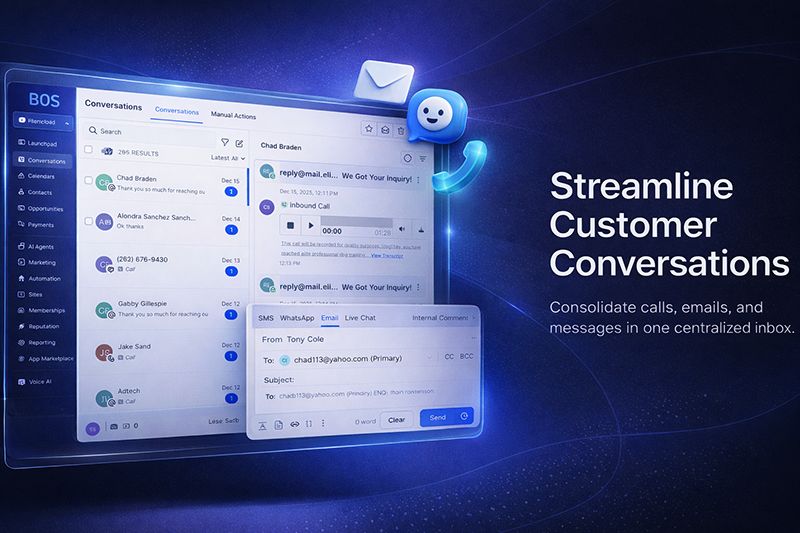
Modern comprehensive platforms offer seamless replacement for the disconnected tools most businesses struggle with. Client information flows automatically into projects, which generate invoices without duplicate data entry. Communications stay connected to their relevant contexts, and everything remains searchable from a single dashboard. Learn more about why businesses are shifting to these all-in-one platforms.
These systems eliminate the most common pain points: no more exporting data from one tool to import into another, no more reconciling conflicting information across platforms, and no more paying for redundant features across multiple subscriptions. Everything works together because it was designed as a unified whole from the beginning.
Real Results: Local Businesses That Switched and Saved
The proof of any system is in the results it delivers. Local businesses across industries have reported dramatic improvements after consolidating their tech stack into an all-in-one solution. These aren’t hypothetical benefits—they’re documented outcomes from real companies just like yours.
Jim’s Plumbing Cut Monthly Expenses by 62%
Jim Harding ran his 7-person plumbing business with 14 different software subscriptions, spending over $1,200 monthly on tools that barely talked to each other. After transitioning to a unified platform, his monthly tech expenses dropped to $450 while eliminating data entry errors that had previously cost thousands in billing mistakes. “We’re saving money while getting more done,” reports Jim. “The biggest surprise was how much mental bandwidth we got back by not constantly juggling different systems.”
How Riverside Boutique Eliminated 13 Different Subscriptions
Maria Cortez’s clothing boutique struggled with inventory management that didn’t connect to her POS system, marketing tools disconnected from customer data, and a social media scheduler that worked in isolation. By moving to an all-in-one platform, she eliminated 13 separate subscriptions and gained powerful automation that previously required manual intervention. “I’m actually using features I’m paying for now,” Maria explains. “Before, I was subscribing to tools where I used maybe 10% of what they offered, but paying 100% of the price.” Learn more about how businesses are switching to all-in-one systems.
From 5 Hours of Admin Work to 45 Minutes
Accountant Bradley Wong spent nearly a full day each week just managing the transfer of data between his client tracking system, project management tool, and billing platform. After switching to an integrated system, that administrative burden dropped to less than an hour weekly. “I’m essentially working a four-day week now with the same output,” says Bradley. “The time I used to spend on administrative busywork is now billable client time. It’s like hiring an assistant without the payroll expense.”
These businesses aren’t unique. They represent the typical experience when companies stop paying for disconnected tools and start investing in systems designed to work together from the ground up. But achieving these results requires a thoughtful transition strategy.
How to Transition Without Losing Critical Data
The biggest concern most business owners express about switching systems isn’t the cost or learning curve—it’s the fear of losing valuable historical data or disrupting ongoing operations. With a strategic approach, you can migrate without these risks.
The 3-Week Migration Plan That Works for Any Business
Successful migrations follow a three-phase approach that prevents disruption while ensuring nothing important gets left behind. Week one focuses on data mapping and export preparation, identifying exactly what information needs to transfer and where it will live in the new system. Week two involves the actual data migration, with parallel testing to ensure everything transferred correctly. Week three centers on team training and workflow optimization, making sure everyone understands not just how to use the new tools, but how to leverage them for maximum efficiency.
This methodical approach prevents the common mistake of rushing into a new system without proper preparation, which typically results in lost information and frustrated team members. By following this timeline, even businesses with years of accumulated data can transition smoothly.
Which Data to Keep and What to Leave Behind
Not all historical data deserves to make the journey to your new system. Smart migrations use the transition as an opportunity to clean house, removing outdated information that creates digital clutter. Client contact details, transaction histories, and project documentation are essential to preserve. But ancient email threads, superseded document versions, and inactive leads from years past can often be archived separately rather than migrating into your clean new environment.
The guideline that serves most businesses well is simple: if you haven’t accessed the information in the past 12 months and have no regulatory reason to maintain it in your active system, it’s a candidate for separate archiving rather than migration. This selective approach results in a cleaner, faster system launch without the baggage of digital clutter.
Training Your Team Without Productivity Loss
The human element of system transitions often determines their success more than technical factors. Even the most powerful platform delivers no value if your team resists using it. Effective training approaches focus first on the “why” behind the change, helping team members understand the personal benefits they’ll experience from the new system. Then training should prioritize daily-use functions that deliver immediate productivity gains before introducing more advanced capabilities.
The most successful transitions designate internal “power users” who receive advanced training and serve as in-house resources for their colleagues. This approach creates system advocates within your team while reducing dependence on external support as questions arise.
Many businesses find that a phased training approach works best—introducing core functions first, allowing for adaptation, then gradually unveiling more sophisticated capabilities as the team builds confidence. This prevents the overwhelm that can occur when too many new processes are introduced simultaneously.
Your Next Steps to Simplify Your Business Today
Transforming your business operations doesn’t happen overnight, but it can begin today. Start by conducting a software audit—list every subscription your business currently pays for, how often each tool is actually used, and what core function it serves. Identify overlaps, underutilized features, and integration gaps that create extra work. This honest assessment typically reveals immediate opportunities for consolidation even before you transition to a comprehensive solution. Armed with this information, you can explore all-in-one platforms like Melp that replace your fragmented tools with a cohesive system designed to work as a unified whole.
Frequently Asked Questions
Business owners considering the switch to an all-in-one system typically share common questions about the transition process and potential limitations. Here are straightforward answers to the most common concerns.
How much does an all-in-one system typically cost compared to multiple tools?
All-in-one business systems typically cost between $50-150 per month for small businesses, depending on the number of users and specific features required. While this might initially seem comparable to a single premium software subscription, it replaces an average of 7-12 separate tools—resulting in net savings of 40-70% for most businesses. The true cost benefit comes not just from subscription consolidation but from the elimination of integration tools and the reduction in administrative hours spent maintaining multiple systems. For more insights on developing efficient business systems, consider exploring steps to develop a successful mobile app.
Will I lose features by switching to a single platform?
Today’s comprehensive platforms offer 90-95% of the functionality most small businesses actually use in their specialized tools. While you might lose some advanced features that specialized software provides, most businesses discover they weren’t utilizing those capabilities anyway. The tradeoff is gaining powerful integrated workflows that weren’t possible with disconnected systems. In rare cases where truly specialized functionality is required, modern all-in-one platforms typically offer API connections to integrate those tools while maintaining the central system as your operational hub.
How long does it take to fully transition from multiple tools?
The typical business can complete a full migration to an all-in-one system in 3-4 weeks, with basic operations running on the new platform within 7-10 days. The timeline varies based on the volume of historical data to transfer and the complexity of existing workflows. Most providers offer migration assistance that significantly accelerates the process compared to DIY approaches. For businesses with complex needs, phased migrations can spread the transition over 6-8 weeks to minimize operational disruption.
Can I still integrate with specialty software my business depends on?
Yes. Modern all-in-one platforms are built with integration capabilities specifically because they recognize certain industries require specialized tools. Through standard API connections, webhook automation, and direct integrations with popular specialty software, you can maintain those essential tools while still consolidating the majority of your operations. The key difference is that these integrations become exceptions rather than the rule, creating a more manageable digital ecosystem with your all-in-one platform at the center.
What happens if I need to extract my data later?
Reputable all-in-one platforms provide straightforward data export options that prevent vendor lock-in. Before committing to any system, verify their data portability policies and export capabilities. The best platforms offer complete data export in standard formats (CSV, XML, JSON) that can be imported into other systems if needed. Some even maintain regular automated exports to secure storage as a continuity measure, ensuring you always have access to your business information regardless of system availability. For more insights, read about CRM failures and solutions.
Simplifying your business operations doesn’t mean sacrificing capability—it means focusing on what truly matters. By consolidating your digital tools into an integrated system, you’ll not only save money but reclaim the focus and clarity that drew you to entrepreneurship in the first place.
Tags:
Share:
